[GSoC] Configuring the Docker Cloud for the kworkflow's Jenkins CI
July 2024 (677 Words, 4 Minutes)
Configuring a Docker Cloud for Jenkins using the Docker Plugin
After investigating different methods for launching containers to be used as Jenkins agents and deciding to configure a Docker daemon to be used as a Cloud to provision containers to the Jenkins controller, it is now time to effectively implement this Cloud in the kworkflow’s Jenkins CI.
The basic configuration of the Cloud
The first step was to install the Docker Plugin ( with id docker-plugin ) in the Jenkins controller. The basic configuration setup can be found on the latest GSoC post about Jenkins Agents.
Setting custom images
The regular jenkins/*-agent containers from the Docker Hub registry aren’t enough to run the original collection of CI workflows for the kworkflow project. The actual kworkflow test pipeline interacts with dependencies
that aren’t set up by default on the official Jenkins agents containers, such as kcov and shellcheck. Therefore, these images must be extended to include these required tools.
To use these custom images, I’ve created their respective Dockerfiles and pushed them onto Docker Hub.
The custom images
After experimenting a bit and planning how to set the testing environments for each pipeline for the kworkflow project, I’ve decided to set the tests and container images like the following:
-
There will be a
kw-basiccontainer image. It will install dependencies required for running unit tests, dependencies for documentation generation, and theshfmtpackage required to lint shell scripts. It also is the only container image that will set sudo for the Jenkins user, as it runs commands such asapt-get.It is expected to be the most lightweight image and it should run theunit_tests.yml,test_setup_and_docs.ymlandshfmt.ymlpipelines. -
There will be a
kw-kcovcontainer image. It will installkcov, its dependencies, and the dependencies required to run the unit tests (kcovwill run the unit tests when generating the code coverage, so it is important to ensure the unit tests work). It will be a container image to be run specifically for thekcov.ymlpipeline. -
There will be a
kw-shellchekcontainer image. It will run theshellcheck-reviewdog.ymlpipeline. It basically installsshellcheckandreviewdog.
Pushing the images to Docker Hub
It is straightforward to push your custom Docker images onto the Docker Hub online registry. First of all, create an account on Docker Hub. Then, create a repository. Ensure it is public, otherwise, you will have to manually configure a credential in Jenkins to pull the private repository.
After setting up the repository properly, you have to build the image locally and push it with docker push <image-name>.
But first, ensure that you are logged into your Docker Hub account on the docker CLI, so you can get the push permission. Run docker login -u <your-dockerhub-user> and insert your password.
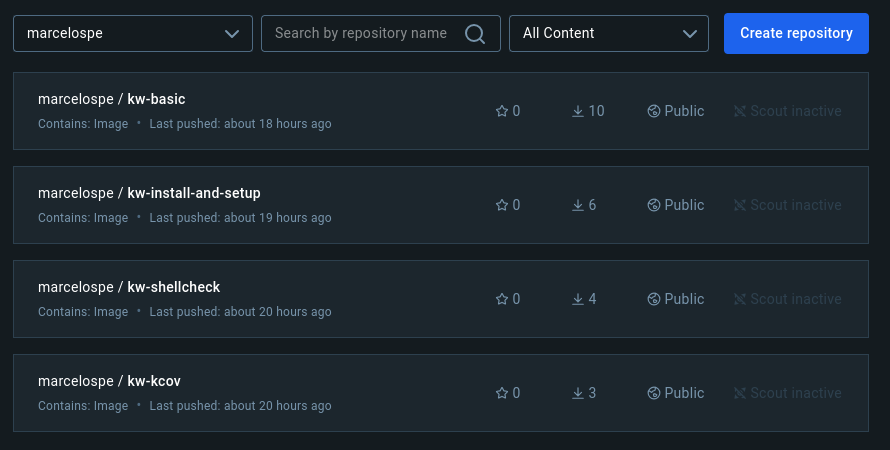
I’ve created four repositories (i.e., four different images) in the namespace marcelospe (my account username).
The marcelospe/kw-install-and-setup repository was created while experimenting a little bit, but, in the
end, I decided to use marcelospe/kw-basic for the test_setup_and_docs.yml workflow.
Some small problems I’ve encountered
- When configuring the use of the custom Docker images, the controller couldn’t start the job on the agents.
It is possible that the problem was caused by extending
jenkins/ssh-agentimages and using the Docker Plugin attach method for connecting with the containers instead of SSH. Extending thejenkins/agentimage for my custom images fixed the problem. - Two test cases are failing for the unit tests in the agents:
./tests/unit/build_test.sh: The test fails on the newfrom_shafeature forkw build. It is likely happening because theunstablebranch from the fork I’m testing the CI doesn’t have the recent fix for this bug./tests/unit/lib/signal_manager_test.sh: Yet to be investigated.
- The
shellcheckpipeline appears to work properly, but thereviewdogis not configured yet. This means that thereviewdogwon’t publish custom commentaries over PR’ed code.
My next steps
This week I will focus on fixing the unit test problems, polishing the repository with the “as Code configuration”
for the CI and integrating the reviewdog into the shellcheck pipeline for the Jenkins CI.
I’ve also noticed recently that, despite configuring different jobs for each Pipeline, the GitHub Branch Source Plugin
won’t produce a new check for each job. It will, instead, overwrite the previous check. It is desired that each
job contains a GitHub Check of its own.
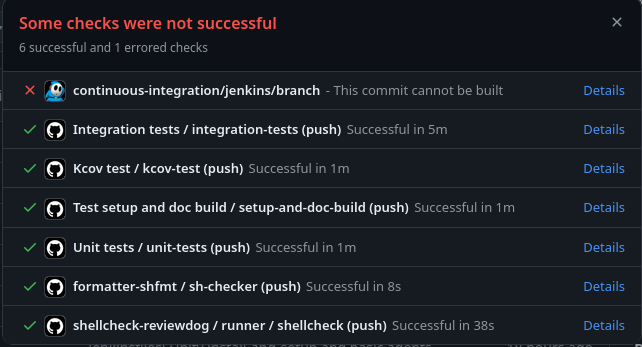
I will see if the GitHub Checks plugin can fix it for me. It enables the communication of Jenkins with
the GitHub Checks API.