My experience with the Linux Kernel Mentorship
August 2026 (3070 Words, 18 Minutes)
Introduction
I’ve been a mentee for the Linux Foundation’s “Linux kernel Spring Unpaid 2026” mentorship, and I’d like to share my experiences with it.
For context, I’ve already been into free software, and I’ve worked on projects such as kworkflow
and the Linux kernel itself. However, I’ve always felt that my kernel contributions were still
very lacking in depth and importance. Most of my contributions were based on simple code style
fixes that enabled me to understand the development workflow, but I did not feel like I was
implementing significant changes for the community at all. Later, I managed to deliver a good
documentation update for the AMD display subsystem, which felt much greater as a contribution,
but was still not enough for me.
Joining the mentorship was an opportunity to force myself to dive deeper into kernel development and put myself into a “new level”. First of all, I wanted to get more technical contributions and attempt to do some programming. Second, I wanted to get more familiar with the workflow. I already knew how to compile the kernel, set up the VM for basic change validation, format patches, submit with git send-mail, track the patch with the kernel lore, and submit new versions. However, the entire process still felt unnatural and filled with overhead. I needed more practice, but also took the opportunity to try new workflows I had not considered yet.
This post will be divided into large sections, each describing a different perspective/topic on what I’ve done/learnt during the last months.
Experimenting with setup
I’ve always used the typical kw flow for build and development. If you do not know the
kworkflow project, I totally recommend checking it out!
My main issue with this workflow was managing my VM environments for kernel deployment. It always felt for me like a burden to manually set up and manage existing VMs. Compiling the kernel was fine. I used the FLUSP guide for x86 VMs. I think it is pretty good, but I wondered if I could do better.
So, before starting to develop at all, I attempted to simplify my deployment pipeline. I had started the mentorship with no preconfigured VM, so I decided to try the syzkaller setup guide. Using debootstrap was a huge improvement over the initial setup, but I still had to manually invoke and boot the VM. For these cases, I usually declare a simple .bashrc alias to replace the QEMU command.
This was already enough, and I was already satisfied, but I suddenly found out about virtme-ng
and decided to give it a try.
Using virtme-ng
I’ve previously heard a lot about virtme-ng in the past, but never tried it. It came to me
by accident during the mentorship, and this time I’ve decided to give it a shot. It ended
up being my definite tool for kernel deployment (and build), and I will describe how I currently
use it for development.
NOTE: All commands must be run inside the kernel tree.
Building the kernel
After using virtme-ng a couple of times to deploy the kernel, and learning about it, I found out
about a pretty useful feature for kernel compilation it has, and that is not present for kw yet:
It can delegate the compilation to a remote host. This is very important for me, since I work on
a laptop but have access to a desktop server with greater computing resources.
I use the following command to build a new kernel image with virtme-ng:
vng --build --build-host <host-address> --build-host-vmlinux
The --build-host (or -b) option sets vng to build instead of running the virtual environment.
The --build-host option sets a remote build and the remote host itself. The latter --build-host-vmlinux
option is necessary so the compiled vmlinux can be retrieved by the guest device.
Running the kernel image
This can be done most of the time with a simple:
vng
However, I’ve found that this simple command can either be optimized or must be modified for specific development contexts.
First of all, we can use the -m option to set a higher memory limit for the virtual environment.
Second, virtme-ng, by default, sets up a very basic and lightweight virtual environment. We may want
something closer to a regular QEMU VM. I later found out that this is the case if we want to reproduce
bugs from syzbot, where we should aim for a similar environment used by syzbot to reproduce the issue.
Finally, use sudo if you want to run the environment as root.
A command with defined memory and a “QEMU-like” setup that worked for me is the following:
sudo vng -m 6G --disable-microvm --qemu-opts="-cpu qemu64"
My opinion on virtme-ng
I really enjoyed using vng for kernel development, and it became my main tool for building and running
kernel images. However, I think it is not the definitive tool, and there are some cases where you might
want to use another approach.
For building, it provides me the remote host option, which is very important for me, but I still think
that kw has better customization in that regard (e.g., ccache and llvm options).
For running the virtual environment, virtme-ng provides a pretty good balance between ease of use,
lightweight environment, and use cases. However, if you come across a very niche and specific scenario,
using QEMU directly may be more versatile and effective to handle some virtualisation options you need.
Working on and submitting the patches
During the year, I worked on a single
patch set that contained exactly 5 patches, with a posterior sixth follow-up commit. It is about a refactor
to the ipv6_flowlabel_mgr selftest file in the netdev subsystem. Next subsections will describe what
has been worked on, the netdev subsystem itself, and how I proceed to submit the patches.
netdev
The netdev subsystem contains most of all networking-related code in the kernel (some network subsystems get a lot of traffic and may have their own development tree and mailing lists, such as wireless drivers).
The netdev community has unique guidelines and internal organization that must be complemented with the general kernel
rules. I would highlight the differentiation of net and net-next, and the strong influence of the merge window on
the patch submission, which caused me to finally understand how the kernel development cycle really works.
First of all, contributors must indicate if they are working on new features for netdev (net-next), or addressing
bugs on current code (net). The patch subject must contain net or net-next inside the [PATCH] bracket, and
net-next patches must not be submitted during a merge window. There are two netdev trees, one for net and net-next.
The mailing list remains the same for both, as the appropriate target is told on the patch subject.
Patchwork
An unexpected aspect of the netdev development workflow that took huge influence on the process is the usage of patchwork to track the patch status and CI validation.
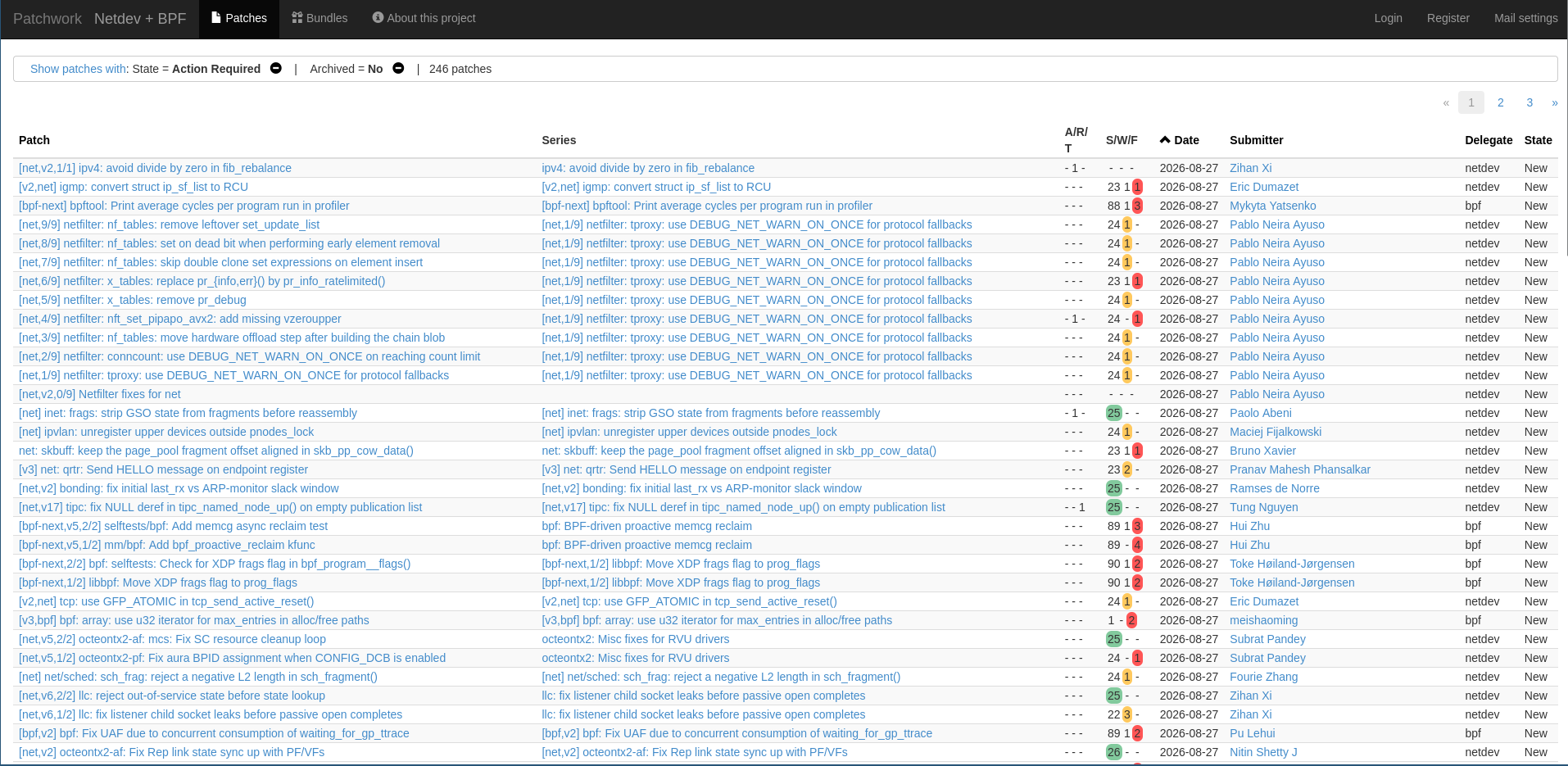
The patchwork is shared with the BPF subsystem. Each patch entry shows information on patch name, series, number of Acknowledge-by’s, Reviewed-by’s and Tested-by’s, CI results, patch date, submitter, corresponding subsystem (netdev or BPF), and state (accepted, new, under review, etc).
During the mentorship, I would usually check patchwork to ensure my patch was triaged, and then navigate to the patch page to check how it performed on CI.
My contributions to netdev: IPV6 flow label manager
During the mentorship, I’ve decided to focus my contributions on netdev + kselftest. I searched the files from the
tools/testing/selftest/net path, looking for some uncovered feature or outdated test, and found the ipv6_flowlabel_mgr
file.
IPV6 flow labels and IPV6 flow label manager
Understanding flow labels requires reading the respective net source code (net/ipv6/ip6_flowlabel.c) and RFC 6437.
According to RFC 6437, a flow is a sequence of packets sent from a particular source to a particular unicast, anycast, or multicast destination that a node desires to label as a flow. For IPV6, it is defined as a 20-bit field on the IPV6 header.
The IPv6 flow label manager comes as a not-so-well-known flow label feature that allows the system user to manually
interact with flow labels: using the IPV6_FL_A_GET action to create/assign a new flow label to a socketfd, using
IPV6_FL_A_PUT action to clear an existing label from a socket, etc.
static int flowlabel_get(int fd, uint32_t label, uint8_t share, uint16_t flags)
{
struct in6_flowlabel_req req = {
.flr_action = IPV6_FL_A_GET,
.flr_label = htonl(label),
.flr_flags = flags,
.flr_share = share,
};

/* do not pass IPV6_ADDR_ANY or IPV6_ADDR_MAPPED */
req.flr_dst.s6_addr[0] = 0xfd;
req.flr_dst.s6_addr[15] = 0x1;

return setsockopt(fd, SOL_IPV6, IPV6_FLOWLABEL_MGR, &req, sizeof(req));
}
The code snippet above shows an example of how it is possible to make a flow label request. One should create an
in6_flowlabel_req setting the fields according to the desired attributes and then pass it as an argument to
the setsockopt function. Making such requests is vital to write the manager tests (the example was taken from the
test file).
Problems found for ipv6_flowlabel_mgr.c and submission of v1
Initially, I noticed a lack of test coverage for the IPV6_FL_A_RENEW action. This action consists of extending
the linger time for a label (when you PUT a label, it waits for the linger time to be freed and enables the label to
be recreated). I developed a small test that creates a label for a socket, puts it, renews it to extend linger time, sleeps longer
than the initial linger but less than the new linger set by renew, and asserts it is still not possible to recreate the label.
However, as I investigated further, I also found other problems. First of all, two request flags were also uncovered
by tests: IPV6_FL_F_REMOTE and IPV6_FL_F_REFLECT.
The former flag, set on a GET request, enables the request to be passed to a getsockopt call, retrieving the label
from the latest received header. This required me to write helpers implementing a simple TCP SYN connection, preparing
the environment for the REMOTE test. Wrapping it in a helper was also a prediction that it would also be necessary for
REFLECT.
The latter flag set a REPFLOW bit for the socket. A socket with this bit set will automatically adopt the label
received from the connected socket. This specific flag also required the flowlabel_consistency sysctl to be disabled,
which led to feedback changes during the review cycle. My initial approach was to manually set it inside the C file.
Finally, I noticed that the file was very old and not following common kselftest conventions. It did not use the selftest harness, relying on manually declared macros inside the file. I took the opportunity to refactor the file and rework it to adhere to the recent standards. This brings immediate benefits to test legibility and avoidance of technical debt and code duplication with fixtures.
This way, the single patch adding coverage to the RENEW action was completely transformed into a patchset with 4 entries. The patches can be formatted with:
git format-patch -v  --cover-letter \
--subject-prefix="PATCH net-next" \
-o outgoing/ ..
(OBS: no need to use -v on version 1)
(OBS: 04233a25as…HEAD would format from 04233a25as to HEAD, excluding 04233a25as)
and the patches can then be submitted with:
git send-email \
--to-cmd="./scripts/get_maintainer.pl --nogit-fallback --no-rolestats" \
--cc-cmd="./scripts/get_maintainer.pl --nogit-fallback --no-rolestats" \
outgoing/*.patch
(OBS: commits must be signed. It can be done using -s for git commit)
The basic workflow from a netdev review cycle
I had already heard about the sashiko tool for agentic reviews of kernel patches, but I just came across it when working for
netdev on this mentorship. Reviews made by agents were the main aspect of my review cycles. The netdev pipeline contains two
sashiko stages: sashiko-nipa returns feedback from the netdev-specific sashiko instance, and sashiko-gemini, which returns feedback
from the sashiko.dev instance.
Jakub Kicinski, who took part in reviewing my patches, would reply to each patch from the patchset with the corresponding review from sashiko (both nipa and gemini). Of course, it was not a mindless copy-paste. The maintainer would only highlight the feedback that was considered valid by the human maintainer. Other types of feedback missed by the AI would be given by the human maintainer in separate mail replies.
This way, even if the CI results were available on Patchwork, I would still wait for the human reply, addressing AI feedback only if it was endorsed by the maintainer, while also checking if it also gave new missing insights.
Alongside agentic review, the netdev Patchwork would also provide other validations, mostly on conventions being followed. For v1
and v2, my patches would fail the get_checkpath.pl checks. I figured later that I should run, for each patch file, the following:
/scripts/checkpatch.pl --strict --max-line-length=80 <patch-file>. The --strict flag enforces all formatting rules, and the
--max-line-length must be 80 for netdev CI checks. Finally, running the checkpatch.pl over the file, instead of doing it
over files, ensures extra check coverage, such as proper commit message formatting, signature, etc.
I did not receive direct feedback for linting/formatting, but I would also introduce these changes on the corresponding faulty commits during the review cycles (and reporting them in the update section of my subsequent cover letters).
How did the patchset change
The patchset was merged on its v3. I will not go through every request and change made, but describe the main changes between v1 and v3. First of all, extra basic tests were added for RENEW, asserting basic calls would return success. The most significant change, however, was related to namespace setup.
A network namespace isolates the test network by having the test on its namespace and the remainder of the host system on the original namespace.
For the feedback on v2, I was asked to handle the creation of namespaces inside the file, an improvement possibility that I missed
on my initial inspection of the code. Initially, ipv6_flowlabel_mgr.c was not a standalone file, but it relied on external scripts to
ensure namespace setup for test execution, calling the helper in_netns.sh file. Therefore, to properly and safely execute the test
on a device, without risking leaking namespace changes to the host, the user should not directly run the ipv6_flowlabel_mgr binary,
but either run the ipv6_flowlabel.sh script (which also runs the other ipv6_flowlabel.c test suite), or run ./in_netns.sh ipv6_flowlabel_mgr.
Having the namespace setup inside the ipv6_flowlabel_mgr suite increases test robustness, avoiding the risk of an “incorrect
execution” and enabling the manager tests to be a self-contained and standalone test suite. Allied with the selftest harness migration,
each test from manager can invoke the internal namespace helper with the aid of fixtures, so we have a custom namespace for each test
instead of a namespace for the suite. The implementation from tests such as ipv6_fragmentation.c was used as inspiration and base
for the change. This specific namespace change introduced a brand new commit to the patchset, which got 5 entries.
Follow-up commit
Right after my patchset got merged, Jakub asked me to submit a follow-up commit. As I made ipv6_flowlabel_mgr independent from
the ipv6_flowlabel.sh wrapper script, I should update this script to exclude the mgr tests. I also had to update the selftest/net
Makefile to declare ipv6_flowlabel_mgr as its own test, so make -C tools/testing/selftests/ TARGET=net would detect it.
I submitted it right before the start of the merge window, when net-next was still open. The patch was approved and merged
with net-next closed. Another interesting observation is that another person (Hangbin Liu) independently added a Reviewed-by
to the commit.
Conclusion
This interaction with the netdev community caused me to get 6 patches merged to the net-next tree (and will probably be merged to
the mainline Linux tree by the end of the merge window).
Other insights
A brief description of other things I’ve learned during the mentorship is present in this section.
Syzbot contributions
I did not get any syzbot contribution merged to the kernel, but I believe I was able to deepen my understanding of how to debug and study syzbot issues.
I was able to properly use virtme-ng to setup reproduction environment for a batch of reported bugs (using the options mentioned previously).
The most relevant knowledge I’ve got was on how to debug the stack trace and easily navigate across functions. The first tool that can be used
is ./scripts/faddr2line, that enables to convert offset entries such as unregister_netdevice_queue+0x274/0x30c from the stack trace to the corresponding
line, using ./scripts/faddr2line <vmlinux-image> <offset>.
Another tool that I’ve been using a lot is vim + cscope to properly jump from a function to its caller, and vice versa. I was introduced to cscope during the mentorship, but did not find it either easy or useful to use in the beginning. However, it started working pretty well when I discovered that it is seamlessly integrated into vim. The cheat sheet below shows extremely useful vim commands to navigate across the stack trace of an issue:
:cs find g xfs_buf_lock        " jump to definition (auto-jumps if unique)
:cs find c xfs_buf_lock        " who calls xfs_buf_lock -> quickfix list
:cs find d xfs_buf_lock        " what xfs_buf_lock calls -> quickfix list
:cs find s xfs_buf              " every reference to the symbol
:cs find t "spin_lock(&bp"     " raw text search
:cs find f xfs_buf.c            " open this file (fuzzy path match)
:cs find i xfs_buf.h            " files that #include xfs_buf.h
Next steps
Learning “how to do kernel code” was not the main aspect of the mentorship for me. Instead, the biggest impact it left on me was to guide me on my journey to insert myself into the community and get things to do and contribute to.
I will probably start a personal project to refactor the net selftests. The other flow label test suite, ipv6_flowlabel.c, would also be greatly improved with a
harness migration, leading to the removal of the ipv6_flowlabel.sh script. I believe many other files can be adapted to the harness structure and have their
test coverage reviewed. This experience showed me that a good and active subsystem may present hidden technical debt, and this is the case for net tests.
Alongside the test coverage changes, I will also be trying to get a syzbot issue addressed in the near future.